

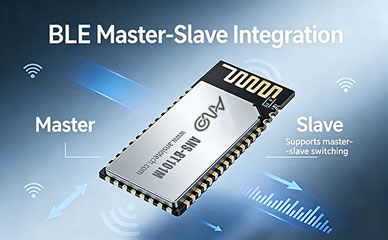
Birçok donanım mühendisi, Bluetooth modülleriyle ilk karşılaştığınızda, çoğu zaman yanılgıya düşüyoruz: herhangi bir modül “seri port geçişini destekleme” yeterli olacak. Fakat, fiili uygulamada, genellikle bağımlı cihazları bulamamak gibi çeşitli tuzaklarla karşılaşırlar, kararsız bağlantılar, kaotik çoklu cihaz yönetimi, ve zayıf uyumluluk. Bu makale sistematik olarak tüm önemli bilgi noktalarını özetlemektedir, bir ana bilgisayar Bluetooth modülünün seçilmesinden ana-bağımlı geçişinde pratik hata ayıklamaya kadar, Anshuo Teknolojisini kullanarak kullanıma hazır yapılandırma adımları sağlar ANS-BT101M master-slave entegre Bluetooth modülü ilk denemede çalıştırmanıza yardımcı olmak için.
BEN. Ana Bilgisayar Bluetooth Modülü Nasıl Seçilir? Five Core Dimensions
Before formally selecting a module, you first need to clarify: what role does your product play in the Bluetooth network? This directly determines what type of module you should buy.
1. Clarify the Role: Central Device vs. Peripheral Device
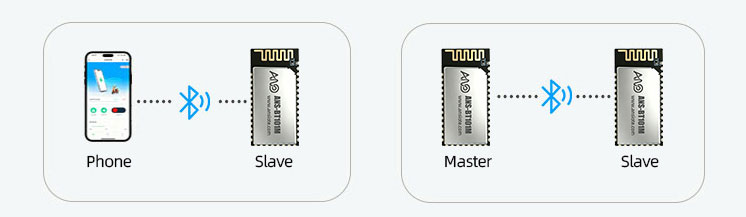
In the Bluetooth Düşük Enerji (BLE) protocol stack, devices are divided into two main roles—Central (master device) and Peripheral (slave device).
Central (Master): Actively scans and initiates connections. Typical scenarios include mobile apps, industrial gateways, smart handheld terminals, and data acquisition devices.
Peripheral (Slave): Passively broadcasts and waits for master connections. Typical scenarios include sensors, giyilebilir cihazlar, and smart locks.
2. Multi-Connection Support: Single Connection vs. Multi-Master/Multi-Slave
For scenarios requiring simultaneous data collection from multiple sensors (such as warehouse inventory management and industrial site monitoring), a single-master/slave architecture is insufficient. In such cases, a module supporting a multi-master/multi-slave architecture is necessary, such as the Anshuo Technology ANS-BT105M, which supports 3 usta ve 3 slave concurrent connections, significantly reducing the number of gateways and lowering system costs.
3. Compatibility and Stability Testing:
Masters are most vulnerable to device incompatibility—connection failures and frequent disconnections when connecting to certain mobile phones or slave devices. When selecting a module, the following compatibility indicators should be carefully verified:
Is it BQB Bluetooth Qualification Body certified?
Is it compatible with mainstream Android/iOS phones (especially flagship models from the last three years)?
Endüstriyel sıcaklık aralığında eskime testlerini geçti mi? (-40°C ila 85°C)?
RSSI sinyal gücü ve parazit önleme özelliği, sahadaki 2,4 GHz bant girişim ortamının gereksinimlerini karşılıyor mu??
4. Güç Tüketimi: Aktif Tarama Sırasında Güç Tüketimi Kontrolü
Tarama aşaması sırasında Bluetooth ana bilgisayarının güç tüketimi, yayın aşaması sırasındaki bağımlı sunucunun güç tüketiminden önemli ölçüde daha yüksektir. Ürün pille çalışıyorsa, aşağıdakiler dikkatle değerlendirilmelidir:
Tarama Penceresi ve Tarama Aralığı yapılandırılabilir mi??
Bağlantı kurulduktan sonraki Bağlantı Aralığı düşük güç parametre anlaşmasını destekliyor mu??
Modül derin uyku modunu destekliyor mu?, ve boşta akım şundan daha azdır: 10 µA?
5. Geliştirme Kolaylığı: AT Komutları vs. SDK Özelleştirmesi
For rapid mass production projects, it is recommended to prioritize modules that provide a rich AT command set. Developers only need to send text commands through the MCU’s UART port, without needing to understand the underlying Bluetooth protocol stack:
II. What is Bluetooth Serial Transparent Transmission? A Visual Guide to Transparent Transmission Principles
Bluetooth Serial Transparent Transmission (BLE UART Transparent Transmission), simply put, turns the Bluetooth module into an “invisible serial cable.”
The data link is: Host MCU UART TX → Bluetooth Host Module → BLE Wireless Link → Bluetooth Slave Module → Slave MCU UART RX. All data remains unchanged throughout the process; developers do not need to understand any Bluetooth GATT/ATT protocol details.
In transparent transmission mode, the development experience for both MCUs is completely identical to that of wired serial ports. The only differences are:
A Bluetooth connection must be established before normal transmission and reception can begin;
Single packet transmission is limited by the BLE MTU (default 20 bytes, negotiable up to 244 bytes);
Real-time performance is affected by the connection interval (typically 7.5ms to 4s, configurable).
III. ANS-BT101M Master-Slave Transparent Transmission in Practice: 5 Steps to Success
The ANS-BT101M from Anshuo Technology is a master-slave integrated Bluetooth module that supports BLE 5.x and features a rich built-in AT command set, making it particularly suitable for scenarios where the module needs to act as the master to actively connect to slave devices. The following are the complete initialization steps for the master-slave single-connection command mode:
Transparent Transmission Mode Switching and Data Transmission/Reception
After successful connection establishment, send AT+TPMODE=1 to switch to transparent transmission mode. Daha sonra, any data received via the serial port will be directly transmitted to the slave device, and the slave device’s response data will also be transparently transmitted back. To exit transparent transmission mode, send +++ (three plus signs, with an interval of no more than 1 ikinci) to return to AT command mode.
IV. Troubleshooting Guide for Common Master-Slave Transparent Transmission Issues
In actual debugging, the following are the 5 most common problems and their corresponding troubleshooting approaches:
Problem 1: No AT+SCAN response or device not detected
Check if the serial port baud rate setting is consistent with the module’s default (usually 115200);
Confirm that the module is powered on normally (VCC voltage 3.3V / current must meet peak requirements);
Check if the slave device is in broadcast mode; the broadcast interval is recommended to be within 100ms;
Confirm that the current mode is master mode (execute the scan after setting AT+TPMODE=0).
Problem 2: Garbled data transmission after successful connection
The UART baud rate, data bits, stop bits, and parity bits of the MCUs at both the master and slave ends must be completely consistent;
Check if BLE MTU triggers packet fragmentation; the receiving end needs to perform data reassembly processing;
After switching to transparent transmission mode (AT+TPMODE=1), confirm that the module no longer echoes AT responses.
Issue 3: iOS Device Cannot Connect
iOS does not support the classic Bluetooth SPP protocol; please ensure BLE (GATT) mode is used.
If using a 16-bit short UUID for the Service UUID, please ensure it does not occupy a UUID segment reserved by Apple.
It is recommended to use a 128-bit custom UUID and register it via AT+UUID commands.
Issue 4: AT Commands Malfunction After Module Upgrade/Flashing
Please confirm whether the flashed firmware version supports AT command mode.
Some modules come with two firmware versions (transparent firmware/AT firmware); please confirm the model suffix.
For any issues, please contact Ansiotech technical support (support@ansiotech.com) for the latest firmware.
V. SSS (Sıkça Sorulan Sorular)
The following are the most frequently asked questions by developers when using Bluetooth master modules, for your reference:
What is the difference between Bluetooth master mode and slave mode?
The master (Master/Central) is the party that actively initiates scanning and connection, such as mobile phones, gateways, and industrial handheld terminals; the slave (Slave/Peripheral) is the party that passively waits for connection, such as sensors, giyilebilir cihazlar, and peripherals. When selecting a module, the appropriate mode must be clearly chosen based on the product’s role; the two modes cannot be used interchangeably.
What is the difference between Bluetooth serial port pass-through and ordinary Bluetooth transmission?
Ordinary Bluetooth transmission requires the application layer to handle GATT protocol, service/feature value read/write logic, vesaire., which has a higher development threshold; while the serial port pass-through solution encapsulates all Bluetooth protocols internally within the module. MCU'nun yalnızca UART aracılığıyla veri gönderip alması gerekiyor, bu, kablolu bir seri bağlantı noktasının çalıştırılmasıyla tamamen tutarlıdır, Geliştirme zorluklarını büyük ölçüde azaltır ve Bluetooth protokol yığınına aşina olmayan donanım mühendislerinin çözümleri hızlı bir şekilde uygulamasına uygun hale getirir.
ANS-BT101M eş zamanlı bağlantıyı kaç tane bağımlı cihazı destekleyebilir??
The ANS-BT101M bluetooth modülü öncelikle tek yöneticili bağlantılar için tasarlanmıştır, ana ve bir yardımcı cihaz arasında verimli veri aktarımını istikrarlı bir şekilde destekler. Projeniz birden fazla bağımlı bağlantı gerektiriyorsa (örneğin, eş zamanlı veri toplama 3 sensörler), ANS-BT105M'yi kullanmanızı öneririz. Bu modeli destekliyor 3 usta ve 3 slave concurrent connections, küçük ve orta ölçekli veri toplama ağlarının ihtiyaçlarını karşılamak.
Bluetooth modülü hem Android hem de iOS telefonlarla uyumlu olabilir mi??
Modules supporting BLE 4.2 and above standards are compatible with both Android and iOS devices. Anshuo Technology’s Bluetooth modülleri have undergone extensive compatibility testing with mainstream mobile phones, supporting stable connections to Android and Apple devices. Note that iOS does not support SPP classic Bluetooth; please select the BLE series model if you need to communicate with Apple devices.
How can I request an Anshuo Technology Bluetooth module sample for testing?
Anshuo Technology offers free sample testing services and supports pre-development evaluation. You can contact us via: sales@ansiotech.com or call 18680305527. We will arrange an engineer to follow up on your needs and provide corresponding model samples and a complete development data package.
VI. Özet
Choosing the right host Bluetooth modülü başarılı Bluetooth ürün geliştirmenin ilk adımıdır. Çekirdek seçim boyutları şunları içerir:: ana/bağımlı mod desteği, çoklu bağlantı özelliği, uyumluluk testi, güç tüketimi kontrolü, ve AT komutlarının kullanım kolaylığı. Hata ayıklama aşamasında, standartlaştırılmış bir AT komut süreci kullanarak (ayar modu → UUID'yi kaydetme → tarama → bağlanma → veri gönderme), Ansiotech'in teknik desteğiyle birlikte, entegrasyon ve hata ayıklama süresini önemli ölçüde kısaltabilir.
Uygun bir tane arıyorsanız Bluetooth çözümü IoT ağ geçitleri için, endüstriyel el terminalleri, akıllı ev kontrolörleri, veya birden fazla çevre birimine aktif bağlantı gerektiren diğer ürünler, Ansiotech'in ürün matrisi, tekli bağlantıdan çoklu bağlantıya kadar eksiksiz bir yelpazeyi kapsar, düşük güçlü BLE'den klasik Bluetooth SPP'ye. Please contact us for customized selection advice.