

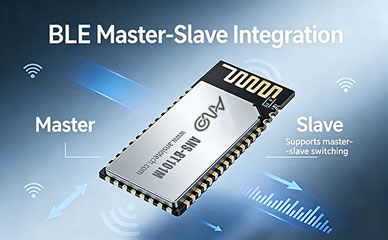
De nombreux ingénieurs matériels, lors de la première rencontre avec des modules Bluetooth, on tombe souvent dans une idée fausse: que n'importe quel module “prise en charge du passage du port série” suffira. Cependant, en mise en œuvre réelle, ils rencontrent souvent divers pièges tels que l'incapacité de trouver des appareils esclaves, connexions instables, gestion chaotique de plusieurs appareils, et mauvaise compatibilité. Cet article décrit systématiquement tous les points de connaissances clés, De la sélection d'un module Bluetooth hôte au débogage pratique du pass-through maître-esclave, et fournit des étapes de configuration prêtes à l'emploi à l'aide de la technologie Anshuo Module Bluetooth intégré maître-esclave ANS-BT101M pour vous aider à le faire fonctionner du premier coup.
je. Comment choisir un module Bluetooth hôte? Cinq dimensions fondamentales
Avant de sélectionner formellement un module, tu dois d'abord clarifier: quel rôle joue votre produit dans le réseau Bluetooth? Cela détermine directement le type de module que vous devez acheter.
1. Clarifier le rôle: Appareil central vs. Périphérique
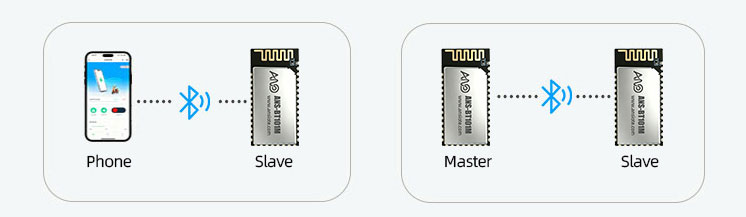
Dans le Bluetooth basse consommation (BLE) pile de protocoles, les appareils sont divisés en deux rôles principaux : Central (appareil maître) et périphérique (appareil esclave).
Central (Maître): Analyse et initie activement les connexions. Les scénarios typiques incluent les applications mobiles, passerelles industrielles, terminaux portables intelligents, et appareils d'acquisition de données.
Périphérique (Esclave): Diffuse passivement et attend les connexions principales. Les scénarios typiques incluent des capteurs, appareils portables, et serrures intelligentes.
2. Prise en charge de plusieurs connexions: Connexion unique vs. Multi-Maître/Multi-Esclave
Pour les scénarios nécessitant la collecte simultanée de données à partir de plusieurs capteurs (tels que la gestion des stocks en entrepôt et la surveillance des sites industriels), une architecture mono-maître/esclave est insuffisante. Dans de tels cas, un module supportant une architecture multi-maître/multi-esclave est nécessaire, comme l'Anshuo Technology ANS-BT105M, qui soutient 3 maître et 3 connexions simultanées esclaves, réduisant considérablement le nombre de passerelles et réduisant les coûts du système.
3. Tests de compatibilité et de stabilité:
Les maîtres sont les plus vulnérables à l'incompatibilité des appareils : échecs de connexion et déconnexions fréquentes lors de la connexion à certains téléphones mobiles ou appareils esclaves.. Lors de la sélection d'un module, les indicateurs de compatibilité suivants doivent être soigneusement vérifiés:
Est-il certifié par l'organisme de qualification Bluetooth BQB ??
Est-il compatible avec les téléphones Android/iOS grand public (surtout les modèles phares des trois dernières années)?
A-t-il passé avec succès les tests de vieillissement dans la plage de températures industrielles (-40°C à 85°C)?
La force du signal RSSI et la capacité anti-interférence répondent-elles aux exigences de l'environnement d'interférence de la bande 2,4 GHz sur le terrain ??
4. Consommation d'énergie: Contrôle de la consommation d'énergie pendant l'analyse active
La consommation électrique de l'hôte Bluetooth pendant la phase de scanning est nettement supérieure à celle de l'esclave pendant la phase de diffusion. Si le produit est alimenté par batterie, les éléments suivants doivent être soigneusement évalués:
La fenêtre de numérisation et l'intervalle de numérisation sont-ils configurables ??
L'intervalle de connexion après l'établissement de la connexion prend-il en charge la négociation des paramètres de faible consommation?
Le module prend-il en charge le mode veille profonde, et le courant de repos est-il inférieur à 10 µA?
5. Facilité de développement: Commandes AT vs. Personnalisation du SDK
Pour des projets de production de masse rapides, il est recommandé de donner la priorité aux modules qui fournissent un riche jeu de commandes AT. Les développeurs n'ont qu'à envoyer des commandes de texte via le port UART du MCU, sans avoir besoin de comprendre la pile de protocoles Bluetooth sous-jacente:
II. Qu'est-ce que la transmission transparente série Bluetooth? Un guide visuel des principes de transmission transparents
Transmission transparente série Bluetooth (Transmission transparente BLE UART), en termes simples, transforme le module Bluetooth en un “câble série invisible.”
La liaison de données est: Hôte MCU UART TX → Module hôte Bluetooth → Liaison sans fil BLE → Module esclave Bluetooth → MCU esclave UART RX. Toutes les données restent inchangées tout au long du processus; les développeurs n'ont pas besoin de comprendre les détails du protocole Bluetooth GATT/ATT.
En mode de transmission transparent, l'expérience de développement pour les deux MCU est complètement identique à celle des ports série filaires. Les seules différences sont:
Une connexion Bluetooth doit être établie avant que la transmission et la réception normales puissent commencer;
La transmission d'un seul paquet est limitée par le BLE MTU (défaut 20 octets, négociable jusqu'à 244 octets);
Les performances en temps réel sont affectées par l'intervalle de connexion (généralement 7,5 ms à 4 s, configurable).
III. Transmission transparente maître-esclave ANS-BT101M en pratique: 5 Les étapes du succès
Le ANS-BT101M d'Anshuo Technology est un module Bluetooth intégré maître-esclave qui prend en charge BLE 5.x et dispose d'un riche jeu de commandes AT intégré, ce qui le rend particulièrement adapté aux scénarios dans lesquels le module doit agir en tant que maître pour se connecter activement aux appareils esclaves. Voici les étapes d'initialisation complètes pour le mode de commande maître-esclave à connexion unique:
Commutation transparente du mode de transmission et transmission/réception de données
Après un établissement de connexion réussi, envoyer AT+TPMODE=1 pour passer en mode de transmission transparent. Après, toutes les données reçues via le port série seront directement transmises au périphérique esclave, et les données de réponse de l'appareil esclave seront également retransmises de manière transparente. Pour quitter le mode de transmission transparent, envoyer +++ (trois signes plus, avec un intervalle ne dépassant pas 1 deuxième) pour revenir au mode commande AT.
IV. Guide de dépannage pour les problèmes courants de transmission transparente maître-esclave
En débogage réel, voici les 5 problèmes les plus courants et leurs approches de dépannage correspondantes:
Problème 1: Aucune réponse AT+SCAN ou appareil non détecté
Vérifiez si le paramètre de débit en bauds du port série est cohérent avec la valeur par défaut du module. (généralement 115200);
Confirmez que le module est allumé normalement (Tension VCC 3,3 V / le courant doit répondre aux exigences de pointe);
Vérifiez si l'appareil esclave est en mode diffusion; il est recommandé que l'intervalle de diffusion soit inférieur à 100 ms;
Confirmez que le mode actuel est le mode maître (exécuter l'analyse après avoir défini AT+TPMODE=0).
Problème 2: Transmission de données tronquée après une connexion réussie
Le débit en bauds UART, bits de données, bits d'arrêt, et les bits de parité des MCU aux extrémités maître et esclave doivent être complètement cohérents;
Vérifiez si BLE MTU déclenche la fragmentation des paquets; l'extrémité réceptrice doit effectuer un traitement de réassemblage des données;
Après être passé en mode de transmission transparent (AT+TPMODE=1), confirmer que le module ne fait plus écho aux réponses AT.
Problème 3: L'appareil iOS ne peut pas se connecter
iOS ne prend pas en charge le protocole Bluetooth SPP classique; veuillez vous assurer que BLE (GATT) le mode est utilisé.
Si vous utilisez un UUID court de 16 bits pour l'UUID de service, veuillez vous assurer qu'il n'occupe pas un segment UUID réservé par Apple.
Il est recommandé d'utiliser un UUID personnalisé de 128 bits et de l'enregistrer via les commandes AT+UUID..
Problème 4: Dysfonctionnement des commandes AT après la mise à niveau/clignotement du module
Veuillez confirmer si la version flashée du micrologiciel prend en charge le mode de commande AT..
Certains modules sont livrés avec deux versions de firmware (firmware transparent/micrologiciel AT); veuillez confirmer le suffixe du modèle.
Pour tout problème, veuillez contacter le support technique d'Ansiotech (support@ansiotech.com) pour le dernier firmware.
V. FAQ (Foire aux questions)
Voici les questions les plus fréquemment posées par les développeurs lors de l'utilisation de modules maîtres Bluetooth., pour votre référence:
Quelle est la différence entre le mode maître Bluetooth et le mode esclave?
Le maître (Maître/Central) est la partie qui lance activement l'analyse et la connexion, comme les téléphones portables, passerelles, et terminaux portables industriels; l'esclave (Esclave/Périphérique) est la partie qui attend passivement la connexion, comme les capteurs, appareils portables, et périphériques. Lors de la sélection d'un module, le mode approprié doit être clairement choisi en fonction du rôle du produit; les deux modes ne peuvent pas être utilisés de manière interchangeable.
Quelle est la différence entre le pass-through du port série Bluetooth et la transmission Bluetooth ordinaire?
La transmission Bluetooth ordinaire nécessite que la couche application gère le protocole GATT, logique de lecture/écriture de valeur de service/fonctionnalité, etc., qui a un seuil de développement plus élevé; tandis que la solution d'intercommunication du port série encapsule tous les protocoles Bluetooth en interne dans le module. Le MCU n'a besoin que d'envoyer et de recevoir des données via UART, ce qui est tout à fait compatible avec l'exploitation d'un port série filaire, réduisant considérablement les difficultés de développement et permettant aux ingénieurs matériels peu familiers avec la pile de protocoles Bluetooth de mettre en œuvre rapidement des solutions.
Combien d'appareils esclaves l'ANS-BT101M peut-il prendre en charge la connexion simultanée ??
Le Module Bluetooth ANS-BT101M est principalement conçu pour les connexions à maître unique, prenant en charge de manière stable une transmission de données efficace entre le maître et un appareil esclave. Si votre projet nécessite plusieurs connexions esclaves (par ex., acquisition simultanée de données à partir de 3 capteurs), nous vous recommandons d'utiliser l'ANS-BT105M. Ce modèle prend en charge 3 maître et 3 connexions simultanées esclaves, répondant aux besoins des réseaux d’acquisition de données de petite et moyenne taille.
Le module Bluetooth peut-il être compatible avec les téléphones Android et iOS?
Modules prenant en charge BLE 4.2 et les normes supérieures sont compatibles avec les appareils Android et iOS. Technologie Anshuo Modules Bluetooth ont subi des tests de compatibilité approfondis avec les téléphones mobiles grand public, prenant en charge des connexions stables aux appareils Android et Apple. Notez qu'iOS ne prend pas en charge le Bluetooth classique SPP; veuillez sélectionner le modèle de la série BLE si vous devez communiquer avec des appareils Apple.
Comment puis-je demander un échantillon de module Bluetooth Anshuo Technology à des fins de test?
Anshuo Technology propose des services de test d'échantillons gratuits et prend en charge l'évaluation préalable au développement. Vous pouvez nous contacter via: sales@ansiotech.com ou appelez 18680305527. Nous organiserons un ingénieur pour suivre vos besoins et fournirons des échantillons de modèles correspondants et un ensemble complet de données de développement..
VI. Résumé
Choisir le bon hébergeur Module Bluetooth est la première étape vers un développement réussi de produits Bluetooth. Les dimensions de sélection de base comprennent: prise en charge du mode maître/esclave, capacité multi-connectivité, tests de compatibilité, contrôle de la consommation d'énergie, et facilité d'utilisation des commandes AT. Pendant la phase de débogage, en utilisant un processus de commande AT standardisé (mode de réglage → enregistrement de l'UUID → numérisation → connexion → envoi de données), avec le support technique d’Ansiotech, peut réduire considérablement le temps d'intégration et de débogage.
Si vous recherchez un Solution Bluetooth pour les passerelles IoT, terminaux portables industriels, contrôleurs de maison intelligente, ou d'autres produits nécessitant une connexion active à plusieurs périphériques, La matrice de produits d'Ansiotech couvre une gamme complète de la connexion unique à la multi-connexion, du BLE basse consommation au SPP Bluetooth classique. Veuillez nous contacter pour des conseils de sélection personnalisés.